Case study · AI delegation · Live demo
We used AI to turn 23 pages of project chaos into a one-screen command center

20 emails · 6 sequences · 9 automation rules, rebuilt in one working session. Full story below.
Art director Which image goes here? I don’t see a spec anywhere.
Marketing Is this the same email as page 9? Which one is current?
12 of 20 marked ready6 issues flagged
The campaign belonged to Wonder Wardrobe, a fashion-education brand we work with. The plan: 20 emails across 6 automated sequences, plus the offer, the audience rules, and the landing page copy. All of it lived in one Google Doc that had grown to 23 pages.
In the comments, the art director was asking which image went where. The marketing director was trying to work out which stage of the campaign she was even looking at. The copywriter kept answering both of them with pointers to headings. Scrolling 23 pages had quietly become a project-management method. The launch was getting closer, but the campaign was nowhere close to being published.
If you have ever run a launch out of a doc like this, none of that will surprise you.
In one working session, the Delegatos team rebuilt the document with AI into an interactive command centre. Every email, sequence, and automation rule on one screen, with 6 hidden errors flagged along the way that nobody had caught by reading.
This case study shows how a team can use AI to organise and streamline any project: the before, the after, everything the rebuild caught, and what we delegated next, with a live demo you can click.
The problem: a project nobody could see
“The doc wasn’t wrong. For writing copy, one long page made sense. But the art director couldn’t see which visuals went where, the marketing director couldn’t follow what each stage was for, and the gaps got papered over with endless tagging and comments. The command center gives all three roles the same screen.”
— Daria Andronescu, founder, Delegatos
We must admit, the copywriter wrote an amazing email marketing campaign. But the way he arranged it in a doc makes perfect sense only to the person who wrote it and to nobody else on the team.
- Structured for the writer, not the team. For writing copy, one long page with headings made sense. The art director read it and couldn’t tell which visuals went where, or why. The marketing director couldn’t follow what each stage was for. So everyone tagged everyone. The comment threads became the real chaos for everyone.
- Automation rules buried in headings. The logic that decides who receives what lives in section titles like “Automation: Get a Yes reply to send to Conversion Email 1.” The problem is that reading does not reveal the campaign’s real structure and logic. There was no way to hold the full picture at a glance.
- Duplicated copy that drifts. Those two versions, nine pages apart? Conversion Email 4 contained the entire body of Email 1, pasted in as a “forwarded message.”
- Broken links you can’t see. In a Google Doc, a link’s visible text and its actual URL are two different things. The offer page link read one URL and pointed to another. A testimonial email sent readers to the wrong article.
- Placeholders that never resolve. “Countdown Timer: TBA.” “Insert counter – code.” “Here is your account activation link: ____.” Thirteen image slots marked with asterisks. A doc has no way to make unfinished work visible, so it stays unfinished.
None of this is carelessness. It is what happens when if-then paths are kept as pages of text.
McKinsey Global Institute estimated back in 2012 that knowledge workers spend roughly a fifth of the workweek just looking for information. A 23-page campaign doc is your own private version of that tax.
What we built with AI: an email campaign command center
Picture the whole launch laid out on one screen, like a map. Every email is visible. Every rule is written on the line between the emails it connects. Every gap is marked.
An email campaign command centre is one interactive screen holding the offer, the audience rules, every email’s full copy, the automation logic, and the status of each piece. It manages the campaign before anything is sent: planning, review, and QA.
We took the doc it exactly as it was, comments, TBAs, and blanks included. Tidying would have hidden the problems we wanted caught, and frankly, nobody had the appetite for one more pass through 23 pages. Our tool for the build was Claude, which hosts the result as a shareable interactive HTML page; other capable AI assistants can do the same job.
One working session later, the plan had a new shape:
- Overview: the offer and its math (the €79 class, three bonuses worth exactly €79, the 7-day deadline), the audience source, and the exclusion lists.
- Campaign flow: all six sequences as a visual map. Each email is a clickable tile that opens its full copy. The automation rules sit on the arrows between the tiles, where logic belongs.
- Flagged issues: everything wrong or unfinished, ranked by severity, each linked to the email it lives in.
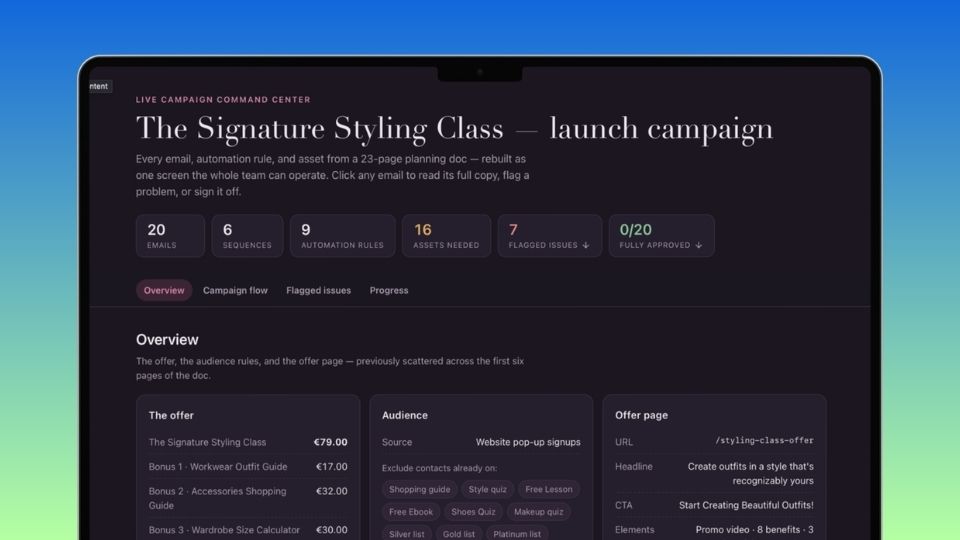
This is the tool itself, not a picture of it. Open emails, filter by status, mark them ready.
Open the live demo| 23-page Google Doc | Command center | |
|---|---|---|
| Where the automation logic lives | Inside headings, page by page | On the connectors between emails |
| How errors surface | Someone happens to notice | 6 issues flagged automatically |
| Answering “what’s the status?” | Re-read, scroll, ask in comments | One click shows what’s blocked |
| Who the structure serves | The copywriter who wrote it | Copy, visuals, and strategy in one view |
Twenty emails and nine automation rules, all visible at once. That view simply did not exist before. The closest thing the team had was scrolling.
What changed for the team
The real change is what the week feels like for the five people running the launch. The campaign became something the team works on together instead of something each person reads alone. That happened because the command centre works like a small app you click around, not like a document you read top to bottom.
Five features carry the difference.
Every email opens with one click
Each email is a tile on the screen, like a sticky note on a whiteboard. Click it and the full text, subject line, and sending time open in one panel.
Before Copy, timing, and visuals scattered across 23 pages
Now One place to edit each email, zero duplicates
The sending logic sits on the arrows
“Wait 48 hours.” “If she replies yes.” The rules are written on the connections between emails, where those decisions actually happen.
Before Rules hidden inside document headings
Now The whole customer journey, traceable in a minute
You see what’s ready and what isn’t
Every email is labeled with what it still needs: images, fixes, or nothing at all. A count updates as work gets done.
Before Ask each person, wait for replies
Now One click shows what’s blocked
Missing assets are pinned where they belong
All 16 missing visuals and countdowns sit as labeled placeholders on the exact emails that need them.
Before “Which image goes where?”
Now The asset list is on the screen, in context
The review pass is built in
As each email gets approved, the team marks it ready and the count climbs: 12 of 20, then 20 of 20.
Before “Are we actually ready?” the night before
Now A visible answer, no asking required
What we delegated to AI next
Preparing the launch was half the job. Once every email was marked ready, we connected Claude to Wonder Wardrobe’s email marketing platform (via MCP, a standard that lets AI work inside other tools) and tasked it with the build itself: all 20 emails and all 6 automations, created directly in the platform.
The entire build took a few hours. Done by hand, copy-pasting each email and clicking together each automation, it would have cost the team about two-three more days.
This is AI delegation in practice: the team decides what good looks like, and the AI does the routine build.
That build deserves its own post; subscribe so you don’t miss it.
FAQ
How do you use AI to organize a messy project?
Hand the AI the full project doc, unedited, and ask it to rebuild the plan as a working tool rather than summarize it. Structure, statuses, and gaps come out of that one pass: whatever the AI cannot resolve becomes a flagged issue for the team to fix.
Can AI replace project management software?
For this team, it replaced the planning layer: the doc, the flow diagram, and the status meetings. Your delivery tools keep their jobs. The honest answer is that AI replaces the chaos around your tools more than the tools themselves.
Can AI replace email marketing software?
No. You still need your platform for delivery, list management, and reporting. But connected AI can work inside it: in this case, all 20 emails and 6 automations were built in the platform via MCP in a few hours. What AI replaced is everything around the sending tool: the planning doc, the flow diagram, and the pre-launch QA pass.
What AI does this require?
We used Claude, which hosts the dashboard as a shareable page. Other AI assistants can do the same job; the requirements are reading a long document accurately and generating an interactive page from it.
How long does the rebuild take?
One working session for a project of this size, 20 emails across 6 sequences. The rebuild and the audit happen together; the 6 issues here were flagged during the initial restructuring. The platform build afterwards took a few hours.
Does this only work for email campaigns?
No. The failure modes are format-independent: buried logic, drifting duplicates, invisible link targets, and unresolved placeholders show up in any project that lives in a linear doc, in Google Docs, Notion, or a spreadsheet. The input format only changes how you hand the content to the AI.
Product names, prices, and URLs in the live demo are altered; every defect described is from the real document.
Daria Andronescu
Founder, Delegatos
AI can’t do the work that actually matters: the thinking, the judgment, the ideas. So I delegate the repetitive work for both of my companies to it, and I help other founders do the same. Connect on LinkedIn →
How many days is your planning doc costing you?
Most growing teams lose them the same way: scrolling, tagging, waiting for someone to confirm which version is current. We turn AI tools into working systems, so your people spend their time on judgement and ideas instead. Send us the doc as it is. The mess is exactly what the rebuild catches.